
Hey. I just took (and passed) the Burp Suite Certified Practitioner, so I decided to write this article to answer the questions people keep asking me, and to hype up my friends into taking this wonderful cert! Enjoy the read!
The cert in a nutshell
-
Prep course: the Web Security Academy is 100% free. The only thing you pay for is the exam voucher. So you can grind through the entire syllabus without spending a dime until you actually feel like attempting the cert.
-
Voucher price: $99 per attempt, but the rate changes depending on the currency. In practice, £69.00 or €89.00 depending on the card you use. Conversions at the May 2026 rate:
- £69.00 ≈ 80 € ≈ 87 $
- €89.00 ≈ 96 $ ≈ 76 £
- 99 $ ≈ 92 € ≈ 79 £
In France, with 20% VAT to add on top: £69 comes out to ~96 €, $99 to ~110 €, €89 to ~107 €. So paying in GBP is the cheapest option, taxes included.
-
Prerequisite: a Burp Suite Pro license (~$499/year). Mandatory, since the exam requires you to upload the
.burpproject file at the end. A 30-day trial is possible with a work/school address or a personal domain, so you don’t necessarily have to pay for the license! (I’ve read about people who passed the exam on trial versions with no issue) -
Format: 4 hours, two web applications, three stages per app:
- Get a user account
- Pivot to an admin account
- Read
/home/carlos/secretvia the admin panel
-
No report to hand in. You validate each stage by successively grabbing a user account, an admin account, then the flag obtained via RCE — a simple copy-paste is enough.
-
Proctoring: webcam and mic on at all times, sharing all your screens, ID to present. Worth noting: it now works on Debian / Linux and on most modern browsers (unlike what the old write-ups said, back when Windows + Chrome was mandatory).
-
To upload at the end: the Burp project file (
.burp). -
Validity: lifetime.
My background
I took the BSCP after the CWES and the CWEE, so I already had a solid web pentest base. I did the minimum recommended path to gauge my level and my speed, then focused my prep on three axes:
- Getting faster across all the classic vulns and Burp Suite usage.
- Automating deserialization (Java + PHP), with all the payloads pre-generated ahead of time.
- Speed on XSS and DOM XSS, which in my opinion is what can eat up the most time during the exam.
If you’re starting from scratch, plan for more time: count on 3 to 4 months of prep. The courses are really well made, and it’s important that you deeply understand every type of vuln you might run into, and not just copy-paste payloads without understanding them.
Preparation
PortSwigger documents the exact list on this page: How to prepare for the BSCP exam.
Step 1: complete at least one Practitioner lab per topic in the Web Security Academy, i.e. 23 labs total (one per topic, don’t skip any).
Step 2: do these 8 specific labs, because they cover techniques PortSwigger considers essential:
- Exploiting cross-site scripting to steal cookies
- Blind SQL injection with out-of-band data exfiltration
- Forced OAuth profile linking
- Brute-forcing a stay-logged-in cookie
- Exploiting HTTP request smuggling to capture other users’ requests
- SSRF with blacklist-based input filter
- SQL injection with filter bypass via XML encoding
- Discovering vulnerabilities quickly with targeted scanning
Step 3: chain through the Mystery Labs. PortSwigger has you pull five random ones as a test, but aim for more like 30 to 50 to really build your methodology.
Step 4: do the Practice Exams (2 available, 2h each, one app). Real conditions, no help. If you clear them cleanly without looking at a solution, you’re (almost) ready.
The best resource for prepping the BSCP is the Botesjuan repo. It covers every vuln category in the syllabus with payloads, exploitation chains, and links to the labs. No need to reinvent the wheel: I used it as backup for all my Mystery Labs. Still worth noting: on the exam you can run into undocumented payload variants that you’ll have to adapt — happened to me.
I very quickly stopped keeping parallel notes. I cloned the Botesjuan repo and added my own notes right into it (okay, I’ll admit it, I barely added anything).
Toolkit
Burp extensions to install from the BApp Store:
| Extension | Usage |
|---|---|
| HTTP Request Smuggler | Detecting and exploiting smuggling |
| Param Miner | Hidden params and headers |
| JWT Editor | All the JWT attacks |
| Hackvertor | Chained encoding/decoding |
| Collaborator Everywhere | Spray the Collaborator everywhere |
| ActiveScan++ | Improved scanning, leave it running |
| Java Deserialization Scanner | Self-explanatory |
Outside Burp:
There are several scanners that pre-identify the vulns (WSAAR, Botesjuan/identify, rustyBSCP from the goat RORO!): I ran them all during the exam, and it didn’t save me any time.
sqlmap handles every SQLi on the exam — this magic command will make you very happy if you find a SQLi on your exam:
sqlmap -u "https://url.net/icilargumentfrero?search=gourmand*&sortby=glace" --cookie="cookie1=XXXXX; cookie2=XXXXX" --batch --level=3 --risk=3 --dump -T usersysoserial for Java deserialization, phpggc for PHP deserialization (it can show up on the exam just like the Java kind, don’t sleep on it), CyberChef for quick encoding manipulations.
Java deserialization can appear at stage 3 (the final RCE that reads /home/carlos/secret). So I built a script (a bit hacky, but it got the job done for the exam) that outputs a custom payload wordlist to paste into Intruder to grab the flag.
It’s YoyoSerialBSCP: it automatically generates payloads for all 34 ysoserial gadget chains with encodings (base64, hex, gzip) ready for Intruder, and offers a dedicated BSCP exfiltration mode (targets /home/carlos/secret by default, exfil via Collaborator or Exploit Server). Examples:
python3 ysoserial_exfil.py --collab abc123.oastify.comYou load the generated payloads.txt into Intruder, you disable payload encoding on the Intruder side (the script already encodes them), and you fire. It’s the fastest way to wrap up a deserialization RCE.
Exam
Hardware prep: an up-to-date Burp Pro with a fresh project ready, all the extensions mentioned above enabled and configured, cheat sheet open in the browser, webcam and mic checked, ID out, something to drink within reach. Kill every source of distraction (Discord, OS notifs, mail, etc.). A little motivating music in the background to stay focused: something like this.
The rules of the game (official, know them by heart)
Source: the official How the BSCP exam process works page. Read it in full before the exam, seriously.
- No hidden files or pages. You never need to dirbuster, gobuster, or guess parameter names. Everything is reachable naturally.
- Existing accounts: there’s always an
administratoraccount, and usually (not always) a low-privcarlosaccount. The ultimate goal is to read/home/carlos/secretvia the admin panel. - Active user: “up to one active user” per app (so 0 or 1), logged in either as
administrator, or (very often, but not necessarily — it can be another one from the wordlist) ascarlos. - Behavior of the active victim: it visits the homepage every 15 seconds and automatically clicks any link in an email sent from the app; it also loads the payloads sent by the exploit server. Handy for XSS, CSRF, OAuth, etc.
- Official wordlists for brute-force / cluster bomb: use only the PortSwigger ones: auth-lab-usernames and auth-lab-passwords. No need to break out rockyou.
- Internal SSRF: the target is always
localhost:6566. No other ports to scan. - Host Header attacks allowed, and the
_laband_lab_analyticscookies are reserved for the system — they’re not valid vectors. - You can break your instance for good: don’t delete your account, the admin, or system files via RCE (official source).
Vuln mapping by stage
Two useful maps exist, based on different sources. Don’t confuse them.
1. The Botesjuan mapping (empirical). Vulnerabilities actually encountered on the exam by candidates, consolidated in his repo. (the exam has evolved since, so don’t lean on it ;) )
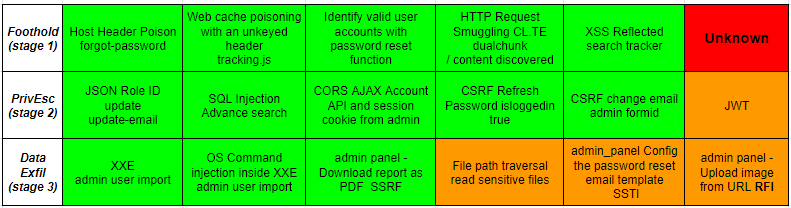
2. The Micah Van Deusen mapping (theoretical). A cross-reference by vuln category and likely stage, based on the PortSwigger syllabus and his exam. More general-purpose. Available in his BSCP write-up:
| Category | Stage 1 | Stage 2 | Stage 3 |
|---|---|---|---|
| SQL Injection | ✔️ | ✔️ | |
| Cross-site scripting | ✔️ | ✔️ | |
| Cross-site request forgery (CSRF) | ✔️ | ✔️ | |
| Clickjacking | ✔️ | ✔️ | |
| DOM-based vulnerabilities | ✔️ | ✔️ | |
| Cross-origin resource sharing (CORS) | ✔️ | ✔️ | |
| XML external entity (XXE) injection | ✔️ | ||
| Server-side request forgery (SSRF) | ✔️ | ||
| HTTP request smuggling | ✔️ | ✔️ | |
| OS command injection | ✔️ | ||
| Server-side template injection | ✔️ | ||
| Directory traversal | ✔️ | ||
| Access control vulnerabilities | ✔️ | ✔️ | |
| Authentication | ✔️ | ✔️ | |
| Web cache poisoning | ✔️ | ✔️ | |
| Insecure deserialization | ✔️ | ||
| HTTP Host header attacks | ✔️ | ✔️ | |
| OAuth authentication | ✔️ | ✔️ | |
| File upload vulnerabilities | ✔️ | ||
| JWT | ✔️ | ✔️ |
Stage 1 - getting into a user account XSS, CSRF, Clickjacking, DOM-based, CORS, HTTP request smuggling, access control, authentication, web cache poisoning, HTTP Host header, OAuth, JWT.
Stage 2 - pivot to admin Same as Stage 1, plus SQL injection.
Stage 3 - RCE and reading /home/carlos/secret
SQL injection, XXE, SSRF (to localhost:6566), OS command injection, SSTI, directory traversal, insecure deserialization (Java with ysoserial, PHP with phpggc), file upload.
⚠️ Take this as a hint, not a rule. Both of these mappings come from community write-ups, not from an official PortSwigger document.
Scan and brute-force strategy
The idea is to parallelize. Right from the start:
- App 2: launch a crawl & audit scan in medium mode on the root. You let it run while you work elsewhere.
- App 1: a light scan so you don’t waste time, and you go at it manually in parallel.
- At the same time, fire an Intruder cluster bomb on the login with the
auth-lab-usernames×auth-lab-passwordswordlists. On apps with a standard login endpoint, it can hand you a user account while you’re doing something else. - During the later phases, spam per-insertion-point scans on every suspicious parameter. I’m insisting on this insertion-point scan because it can spot things the general scan will miss, and above all it’s faster since there’s a rate-limit throttling the scans’ requests during the exam.
- If you’re stuck on app 1 and the app 2 scan has finished with nothing conclusive, don’t waste time: send in a specialized scanner (HTTP Request Smuggler, for example) to clear the ground while you keep going.
Concrete tips
- Very few rabbit holes on the BSCP. If you see a
"forbidden character"message, or any other custom error message, you’re 99% on the right track. Keep pushing. - Facing a blacklist, fuzz character by character, then word by word. The exam is short and the filters are generally verbose (they tell you what got blocked, or return a different error depending on what goes through). Run an Intruder over each ASCII character, then over the SQL/JS keywords, to pin down the blacklist precisely, then adapt your payload.
- Systematically combine Exploit Server + Collaborator. When a payload doesn’t fire via Collaborator, retry via the Exploit Server. And vice versa. (sometimes one works and the other doesn’t)
- The Exploit Server also gives you an email address you can use to receive messages (OAuth, password reset, invite links).
- The
Discovering vulnerabilities quickly with targeted scanninglab is your friend. Redo it 5 times before the exam — it’s exactly the methodology you’ll be applying on loop for 4h. - The victim runs on Chromium: your XSS payloads have to work there (no Firefox-only syntax).
- Save the Burp project regularly, and upload the
.burpfile at the end. Without it, it’s an administrative fail no matter how many flags you got.
My experience during the 4h
Kickoff: I launch Examinity, ID validated, music in the background, here we go. First reflex: light scan on app 1 + medium scan on app 2 + Intruder cluster bomb on app 1’s login with the PortSwigger wordlists, all in parallel.
App 1 - 3 flags in 20 minutes. Everything falls into place. I find the first stage before the scan even surfaces anything useful. The second stage is obvious, a single exploitable function, no doubt. For the third, a per-insertion-point scan hands me the vuln in 5 minutes and I just have to paste an already-prepped payload. I’m in “this’ll be done in an hour, ez” mode.

App 2 - gut punch. I stay hard stuck for almost 3 hours on the 1st flag. The vuln I suspect keeps returning a custom forbidden message every time I try a bypass. Verdict: the vuln was in the right stage per the “indicative” mapping, but none of the payloads from the PortSwigger labs or the Botesjuan repo worked. I had to improvise, combine two techniques together, and fuzz the blacklist character by character to figure out what got through. That’s what cost me a ridiculous amount of time: I tested every bypass known and findable online, wrote it off as a rabbit hole, before accepting that I had to build my own.
After exhausting every feature and every scan without finding anything else, I circle back to my initial hypothesis, convinced that’s where I need to dig. Bingo.
And right at that moment: just as I finally unlock app 2’s 1st flag, the proctoring tool freezes (and freezes itself on) my Debian PC. I can’t interact with my computer’s OS anymore — all I’ve got left usable is a cli window, my current Chromium window, and Burp. Worse: I originally had two Chromium windows, I minimized one, and now I can’t bring it back up. I didn’t want to reboot mid-exam since my PC was monitored via screen share + camera, nor to waste too much time debugging and risk doing something dumb — I’d have looked super sketchy on the proctoring side. So I finish the last minutes with whatever I have on hand, hoping the proctoring is still running.

Luckily, the last 2 flags fall in 10 minutes: the stage 2 vuln was basically handed to me by a tool external to Burp 👀, and the stage 3 one let itself be found by a simple per-insertion-point scan, nothing especially hard. I finish the exam with about 20 minutes to spare, beads of sweat on my forehead and a half-dead PC.
Super happy to have passed on the first try, because halfway through I’d completely stopped believing I would.
The takeaways:
- Stage 1 is often the longest. Once you’re inside the app, the rest chains together fast because you already know the environment, the functions, the filters, and the newly accessible features become obvious.
- No rabbit holes, but no guarantee on the payloads. I had to adapt or build custom payloads (not a copy-paste from Botesjuan or PortSwigger).
- Trust the app’s signals. A custom error message is never there by accident.
- Test your OS + proctoring setup beforehand. Especially on Linux.
Resources
- Web Security Academy: the foundation, free, complete.
- How to prepare for BSCP: the official page listing everything that’s mandatory.
- Botesjuan, Burp Suite Certified Practitioner Exam Study: the resource.
- YoyoSerialBSCP: my script for generating Java deserialization payloads ready for Intruder, with a dedicated BSCP exfil mode.
- DCKento, BSCP Notes: well-organized alternative notes, useful as a complement.
- Nishacid, BSCP: concrete, structured tips.
- at0m.space, From zero to BSCP: detailed French-language write-up.
Honestly, I can’t recommend this certification enough. For its very accessible price, for the quality of its entirely free resources, and for the technical breadth it covers on the web side. The exam itself isn’t that hard, as long as you’ve seriously grinded the recommended labs (and again, it’s free, you can do as many as you want).
Prep properly, keep a cool head on the day, and trust the signals the apps send back at you. To go further afterwards, check out the CWEE from HTB.
GLHF, and don’t hesitate to ping me on discord if you have questions.